Enterprise Power on a Budget: My APC SMT1500RM2U Refurb (2/2)
Introduction
While the UPS was refurbished, there was still much work to be done. Just because the batteries operated doesn’t mean that they are in good condition.
Intital Runtime Test
Through the UPS front panel, I initiated a runtime test. This test only ended in dismay as the test only ran for 90 seconds before the battery hit 40% and the test ended. What the hell happened?
My immediate thought was that the batteries were dead. If that was the case, I was in for an exercise of returning them to the distributor and having to order more. Even worse, delaying the process would mean I would be without a UPS for a while.
Creating a new way to test
If I had to return them, or diagnose the true issue at hand, I had to devise a way to get a extremely verbose log of the UPS. Unfortunately, through PowerChute Serial Shutdown (APC’s latest program to manage their UPSes) or through the network management card, I was unable to get a verbose log of the UPS. This started a long journey of creating my own path forward.
Research
The official APC software was a dead end. PowerChute, despite its promising name, offered no way to get the verbose, second-by-second data I needed. It was like trying to diagnose a patient’s fever with a calendar instead of a thermometer. I needed a direct line into the UPS’s firmware, and it became apparent that I’d have to build that connection myself.
As mentioned in a few places in this blog, I am a big fan of using python scripts. Such a great language! Python would be a perfect fit for this task. My theory was simple: if I could coax a continuous stream of data out of the UPS, a Python script could act as a translator, catching the raw information and logging it neatly into a .csv file. With that, I could chart, analyze, and finally uncover the truth about my batteries.
The breakthrough came from a piece of hardware I’d installed almost as an afterthought: the AP9631 Network Management Card. While idly clicking through its web interface, procrastinating on the real problem, a few acronyms in a dusty corner of the menu jumped out at me: SSH and SNMP. SSH was tempting, but SNMP… a quick search confirmed it: SNMP was my golden ticket. It was designed for exactly this—querying devices for their vital statistics. The game was afoot.
SNMP
What is SNMP a.k.a. the Simple Network Management Protocol? To understand how it works, you need to know four key components:
- SNMP Manager: This is the computer or server that runs your logging program. It’s the “manager” that actively requests information. In this instance, it is my laptop running the script.
- SNMP Agent: This is a small piece of software that runs on the managed device (e.g., on the AP9631 Network Management Card inside the UPS). The agent listens for requests from the manager, retrieves the requested data from the device, and sends it back.
- Community String: This is like a simple password. The manager must send the correct community string along with its request for the agent to respond. The most common default is public, which is typically used for read-only access.
Note: This applies to older versions SNMPv1 and SNMPv2c. The newer SNMPv3 uses a more secure username/password and encryption model.
But the most critical piece of the puzzle was understanding what to ask for. You can’t just ask the UPS, “How are you feeling?” You need a specific address for each piece of data. This is where the MIB and OIDs come in.
- MIB (Management Information Base): This is the “dictionary” that defines OIDs. The agent has a collection of OIDs that describe all the data it can provide. Eventually, I created a curated list of entries from the standard UPS-MIB and APC’s private PowerNet-MIB.
OIDs
Think of an Object Identifier (OID) as a super-specific home address, but for a single piece of data inside a network device. Just as USA > Oregon > Portland > Main Street > 123 pinpoints a unique house, an OID like 1.3.6.1.4.1.318… uses a sequence of numbers to pinpoint one specific thing, like the battery’s temperature.
Each number narrows the location, creating a globally unique address. To get the data, my Python script (the Manager) would send a “digital mailman” (an SNMP query) with the OID address. The Agent on the UPS card would find that location, read the value (e.g., “25°C”), and report back.
Armed with this knowledge and a curated list of OIDs from the MIB files, I was finally ready to build my tool and conduct a proper interrogation of the UPS. I won’t detail the code here, but it is on my Github! APC_SNMP_LOGGER
Test Results
With my logging program running, I initiated a formal runtime calibration test directly from the network card’s interface. This time, I used a heavy and stable 55% load to give the batteries a real workout.
With my Python logger running, I initiated a formal runtime calibration test directly from the network card’s interface. This time, I used a heavy and stable 55% load to give the batteries a real workout.
The UPS ran for just over 13 minutes before it determined the batteries had hit their 25% capacity limit and ended the test. To put that in perspective, according to APC’s official runtime chart, a healthy battery in this UPS should handle that same 55% load for 21 minutes and 55 seconds before being fully depleted. My “new” batteries couldn’t even last 13 minutes before hitting the 25% emergency threshold. This was a colossal failure, but now I had the data to prove it. The resulting graph wasn’t just a chart; it was a confession.
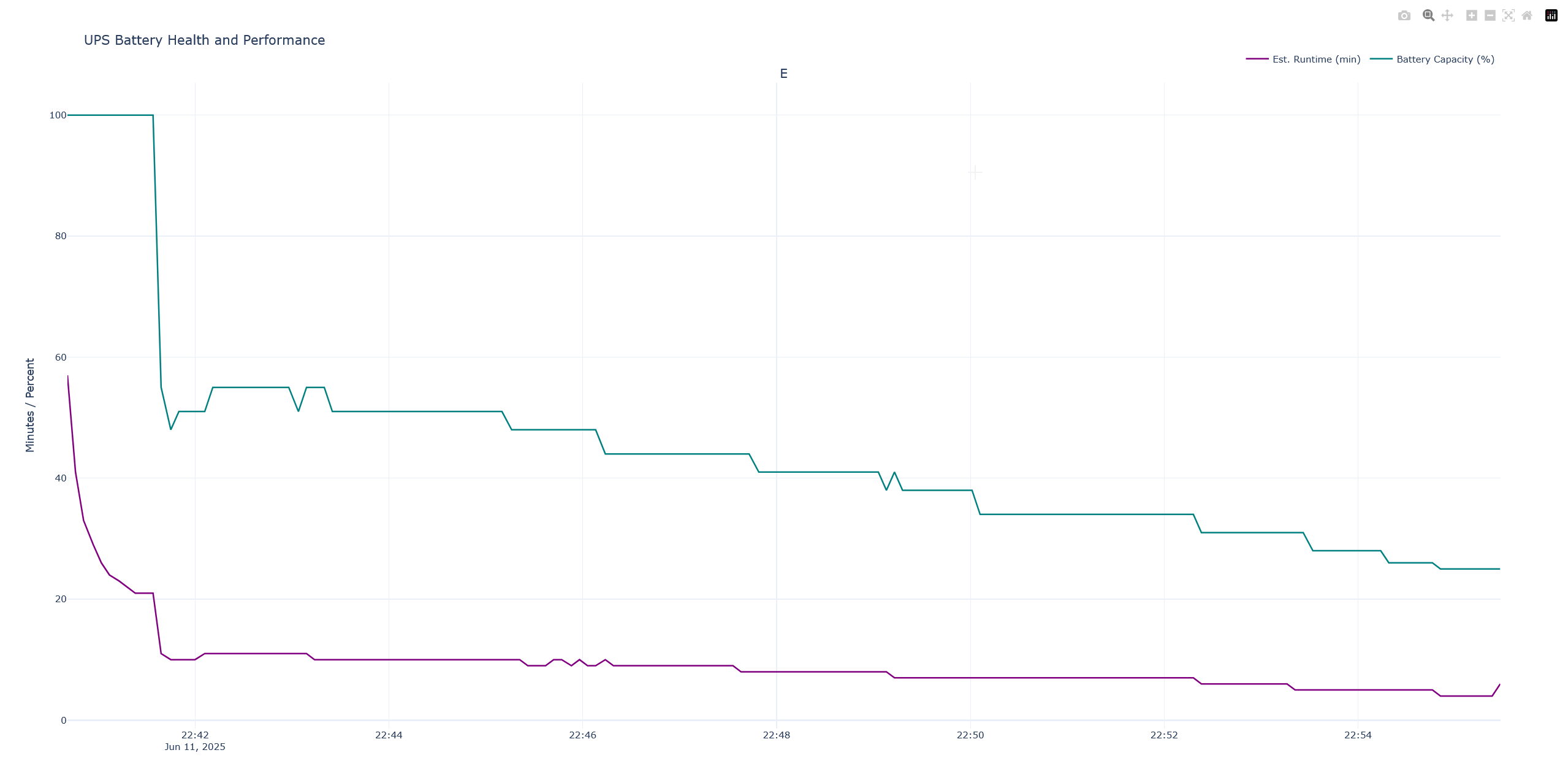
Initial State & The “Lie” of 100%:
- At the start of the test (22:42), the “Battery Capacity” (teal line) reads a confident 100%.
- However, the “Est. Runtime” (purple line) is already telling a different story, showing a much lower value (around 45 minutes) than you would expect from a truly healthy, fully charged battery under a given load.
- Finding: This immediately suggests a discrepancy between what the UPS thinks its capacity is and what the actual health of the battery is. The 100% is a “soft” reading, not a reflection of reality.
The Moment of Truth (The “Cliff”):
- Just after the test begins, there’s a dramatic, near-vertical drop in the Battery Capacity from 100% down to ~50% in a matter of seconds.
- This is the most critical event in the graph. The UPS, now under load from the test, is forced to confront the battery’s real-world performance. It can no longer maintain the illusion of being fully charged.
- Finding: The battery is unable to sustain the voltage under load, causing the UPS’s internal monitoring to rapidly and drastically re-evaluate its health. This is a classic sign of aged batteries with high internal resistance, which hold a “surface charge” that looks good when idle but collapses under real work. This was the proof. The graph confirmed my suspicion that the batteries were undeniably faulty.
The Calibration and “True” Capacity:
- After the initial cliff, the Battery Capacity line (teal) begins a more gradual, stair-step decline. This is the UPS settling in and tracking the actual discharge of the battery under a constant load.
- The capacity drops from ~55% down to ~25% over the course of about 13 minutes.
- Notice how the Estimated Runtime (purple) mirrors this, but with a key difference. It initially plummets and then flatlines at a very low value (around 5-10 minutes) for the majority of the test.
- Finding: The UPS is performing a runtime calibration. It’s learning the true performance curve of these specific batteries. The stair-step pattern shows the UPS recalculating its state as the battery voltage drops under load. The flatlined, low runtime estimate shows the UPS is now giving a much more realistic (and pessimistic) prediction based on the poor performance it’s observing.
How Can “New” Batteries Be Faulty?
But these were new batteries, so how could they suffer a voltage drop? The key is that “new” simply means “never used by a customer” it doesn’t necessarily mean “freshly manufactured.”
Like food on a grocery shelf, batteries have a limited shelf life. Think of it like buying a gallon of milk. It may be sitting on the shelf, but if it’s been in a warm warehouse for months past its expiration date, it’s not going to be good. The same principle applies here.
Here’s how a supposedly “new” battery can be faulty on arrival:
Shelf-Induced Sulfation (The #1 Culprit): This is the most probable cause. If these “new” batteries sat on a warehouse shelf for a year or more without being periodically charged, they would slowly self-discharge. As they sit in this discharged state, irreversible sulfation sets in. The internal plates get coated with hard, inactive crystals, permanently crippling their ability to deliver power. They aged significantly before I opened the box. A “new” battery that sat for 12–18 months in a warehouse without a float charge? Basically already half-dead.
Manufacturing Defect: It’s also possible the batteries had a flaw from the factory. A weak internal grid that can’t handle a load, or active material that wasn’t properly applied to the plates, could cause a cell to fail the very first time it’s put under any real stress.
Improper Storage: Even if they were made recently, storing lead-acid batteries in a hot environment (like a non-climate-controlled warehouse in summer) can rapidly accelerate internal corrosion and degradation, effectively “aging” them in a matter of months.
Conclusion
After analyzing the data, one final piece of the puzzle fell into place. While researching the battery model, I made a crucial discovery: CSB, the manufacturer, puts a date code sticker on every battery so you can know when it was made.
On my batteries, these stickers had been deliberately removed. All four of them. There is only one plausible reason to remove a date code: to conceal the battery’s true age.
This discovery re-contextualized everything. The instant voltage collapse, the high internal resistance, the “new” batteries failing like old ones—it all pointed to a single, damning conclusion: I had almost certainly been sold old, expired stock that was intentionally disguised as new. Time to request an RMA…